
Quick Answer
OpenIPC is a free, open-source project. It turns cheap IP camera boards and Wi-Fi adapters into a digital FPV system. It costs much less than DJI or Walksnail gear. It also needs more setup work. OpenIPC suits hobbyists who like to tinker and want cheap digital video.
What OpenIPC Actually Is
OpenIPC is not a company. It is not one product. It is open-source firmware. That means the code is public. Anyone can use it or improve it for free.
Volunteers built OpenIPC from IP camera hardware. That hardware was first made for security cameras. Builders wrote new firmware for it. The new firmware sends low-delay FPV video instead.
No single company sells a finished OpenIPC product. Instead, small manufacturers make compatible boards. The software keeps improving through shared work by many people. This is very different from DJI or Walksnail. Those brands control their whole system alone.
How It Uses IP Cameras and Wi-Fi Adapters
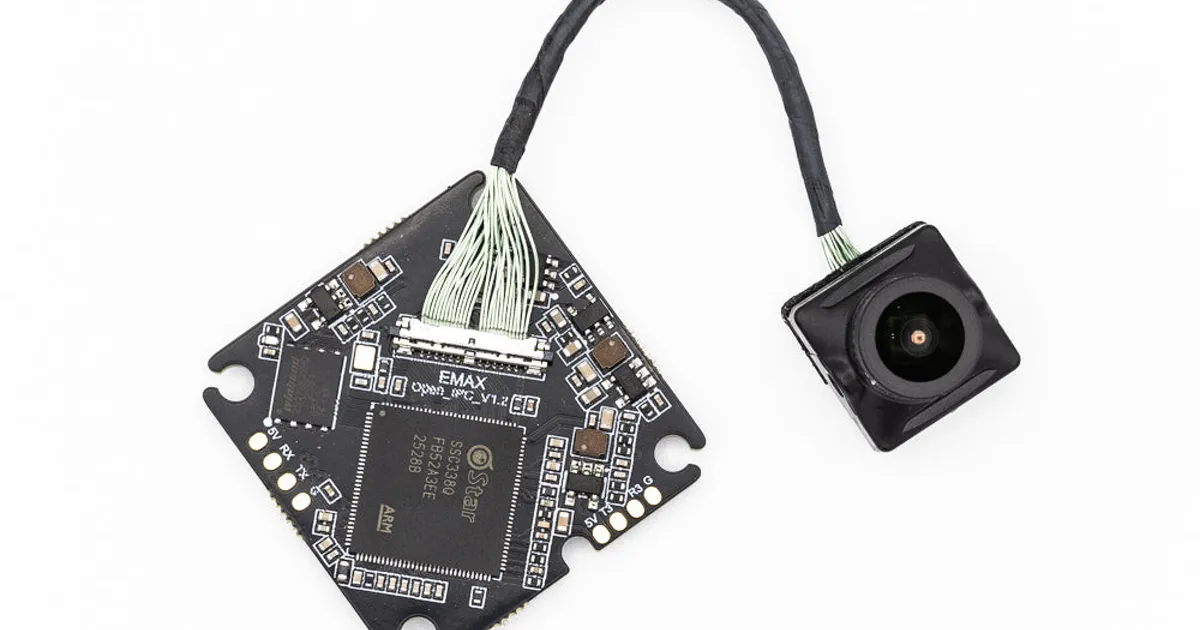
An IP camera is a small camera chip. It is normally used to stream video over a home network. OpenIPC takes this same type of chip. New firmware makes it capture and compress FPV video instead.
To send that video, OpenIPC uses a Wi-Fi adapter. The adapter is set up to broadcast FPV video, not a normal Wi-Fi signal. On the ground, a matching receiver picks up this signal. It decodes the video and shows it on your screen. This use of low-cost Wi-Fi hardware is one reason OpenIPC stays cheap.
Typical Hardware Setup
A basic OpenIPC air unit has three main parts. It has an IP camera board, a small processing board, and a Wi-Fi module. These are often sold as one compact combo unit.
On the ground, you need a matching Wi-Fi receiver. It can plug into many goggles through an adapter. It can also plug into a small ground unit with its own screen.
Small manufacturers sell boards built just for OpenIPC firmware. The parts do not all come from one brand. So check that your camera board, Wi-Fi module and goggles all work together before you buy.
Pros of OpenIPC
- Lower cost. OpenIPC hardware often costs less than DJI or Walksnail gear.
- Open development. The firmware is open-source. Many people add features and fixes.
- More choice. You can pick from several camera boards and lenses. You are not stuck with one brand's lineup.
- No single point of control. You do not depend on one company to keep supporting the product.
Limits of OpenIPC
- More setup work. You must set up the firmware and match your frequencies by hand. This takes more time than a closed system.
- Less simple support. There is no single help line. Help comes from online forums and guides. This can be slow for a total beginner.
- Mixed hardware quality. Many small makers sell boards for OpenIPC. Build quality can vary between sellers.
- Frequency planning still matters. OpenIPC shares the same busy 5.8 GHz space as other gear. Our guide on FPV frequencies and channels explains this in plain words.
Comparing OpenIPC to DJI and Walksnail
| Factor | OpenIPC | DJI / Walksnail |
|---|---|---|
| Cost | Lower | Higher |
| Setup effort | More hands-on | Simpler, more guided |
| Support | Community forums | Official company support |
| Hardware source | Many small makers | One brand |
| Firmware | Open-source, updated often | Closed, controlled by the brand |
If you want to compare old analog video with any digital option, read our guide on analog vs digital FPV. For tips on digital range in general, see our Walksnail range guide. Many of the same ideas about antennas apply to OpenIPC too.
Who OpenIPC Suits
OpenIPC suits hobbyists who like to build and tune their own gear. It suits pilots who want digital video without a high price tag. It also suits people who like open-source software and want more control.
It is a weaker fit if you want a simple, guided setup. It is also a weaker fit for paid filming work. That kind of work needs reliable gear without hours of troubleshooting. If easy setup matters more to you than price, read our FPV goggles guide instead.
Getting Started Sensibly
If you want to try OpenIPC, start with the current guides on the OpenIPC project site. Hardware and settings change often. Buy a full air unit and ground unit combo from one seller. Do not mix parts from many sources on your first build. This keeps your first setup simple.
Join an online community for OpenIPC before you buy anything. Ask which boards work well together right now. Ask about any known issues with the newest firmware. This small step can save you hours of confusion later. It can also help you avoid a bad batch of hardware from a less careful seller.