
Quick Answer
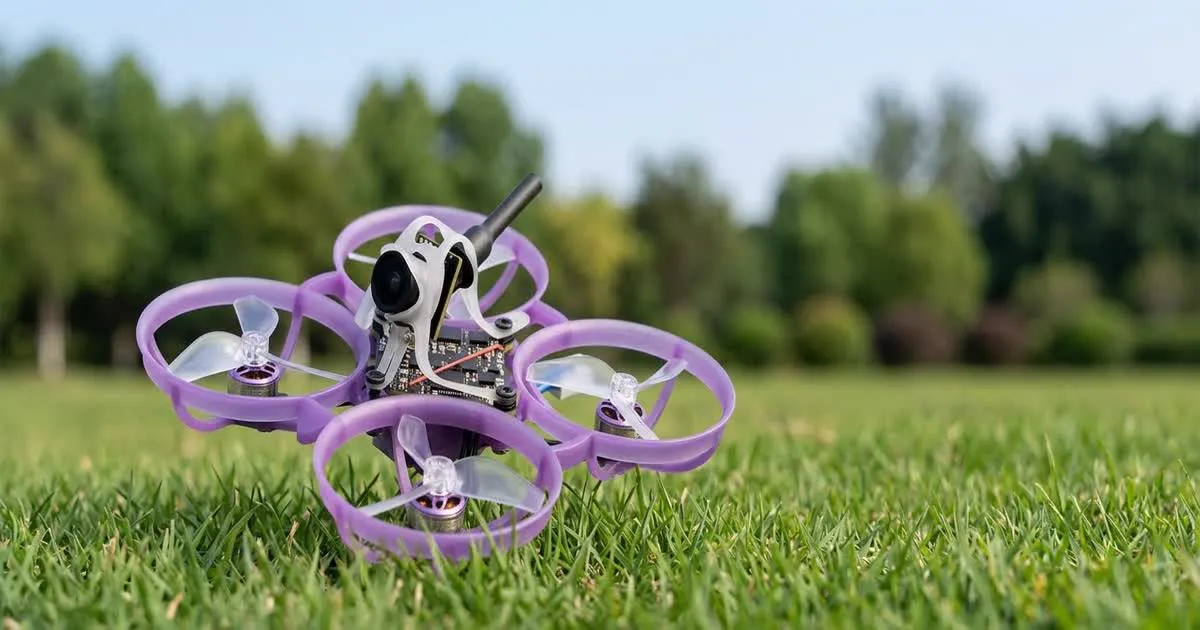
The BETAFPV Air75 II is a small, ducted "tiny whoop" style FPV drone built for safe indoor and close-range flying. To get flying, check the unit out of the box, bind your radio to the receiver, look over the Betaflight settings BETAFPV ships by default, set gentle rates for tight indoor spaces, and treat the 1S battery with care since small cells are more sensitive to abuse than larger packs.
What You Get in the Box
A tiny whoop like the Air75 II is a small quad with ducts around each propeller, which protects the props and anything they might touch. This makes it far safer to fly indoors, close to people, or in tight spaces than an open-prop quad.
Before your first flight, check the frame, ducts and prop guards for any shipping damage. Confirm the props spin freely by hand, without rubbing on the duct, and check that all wiring looks intact with no loose connectors. This is normal practice for any small quad and takes only a minute.
If this is your very first FPV drone, our guide on choosing your first FPV kit explains the difference between ready-to-fly and bind-and-fly options, which affects what else you need to buy.
Binding Your Radio
The Air75 II uses a receiver built around ExpressLRS or a similar protocol, depending on the exact version you bought. To bind:
- Put your radio's internal or external module into bind mode.
- Power on the quad while it is in its own bind mode, usually done with a specific button press or power-cycle pattern described in the manual.
- Wait for the bind confirmation, then power cycle both the radio and the quad and confirm the sticks move correctly on your radio's channel monitor.
Always check stick and switch direction on the monitor screen before you try to arm. A crossed channel is a common first-setup mistake and is easy to catch before it causes a problem in the air.
Betaflight Basics for the Air75 II
The Air75 II runs Betaflight, the same firmware used on most FPV freestyle and racing quads, just tuned for a much smaller, lighter airframe. Connect over USB and open the configurator to check:
- The receiver protocol is set correctly on the ports and receiver tabs.
- Your arming mode and any safety switches are set up the way you expect.
- The motor direction test shows all four motors spinning the correct way for your prop set.
If you have never set up Betaflight before, our full Betaflight setup guide walks through the configurator from first connection through to a pre-flight checklist, and the same steps apply here even though this is a much smaller quad.
Setting Rates for Indoor Flying
Rates control how fast the quad reacts to your stick movements. A tiny whoop flown indoors needs gentler rates than an open quad flown outdoors at speed, simply because you have far less room to correct a mistake.
Start with lower maximum rotation rates and a smooth expo curve, especially on your first few flights. This gives you more precise control at small stick movements, which matters more indoors than raw top speed. You can always raise rates later once you are comfortable flying through doorways and around furniture without clipping anything.
Battery Care for 1S Packs
The Air75 II runs on a single-cell, or 1S, battery. These small packs behave differently from the larger multi-cell packs used on bigger quads:
- They discharge and charge faster relative to their size, so use a charger built for 1S cells with the correct current setting.
- Never leave a 1S pack charging unattended, just as with any lithium battery.
- Store packs at a partial charge rather than full if you will not fly for more than a few days.
- Retire any pack that puffs up, feels unusually warm at rest, or holds noticeably less charge than it used to.
Our guide on choosing FPV batteries covers capacity, C ratings and storage habits in more depth if you want to understand the reasoning behind these habits.
Common First-Flight Issues
Most early problems with a tiny whoop come down to a small number of causes:
- Drone flips on takeoff: usually a motor spinning the wrong direction, or props fitted on the wrong motor posts.
- Weak or jerky control response: often a binding issue or a loose antenna on the receiver.
- Very short flight time: normal for 1S packs compared to larger batteries, but a pack near the end of its life will feel noticeably worse than a fresh one.
- Video signal breaking up indoors: can happen near walls, metal objects or other 5.8 GHz devices. Try a different physical spot in the room before assuming a hardware fault.
Practicing Before You Fly Indoors
Even with prop guards, a tiny whoop can still scratch furniture or startle a pet if you fly it aggressively before you are ready. If you are new to FPV control in general, spending time in a simulator first will shorten your learning curve a lot. Our FPV simulator guide explains how to connect your radio to a computer and practice safely before risking a real crash.