
Quick Answer
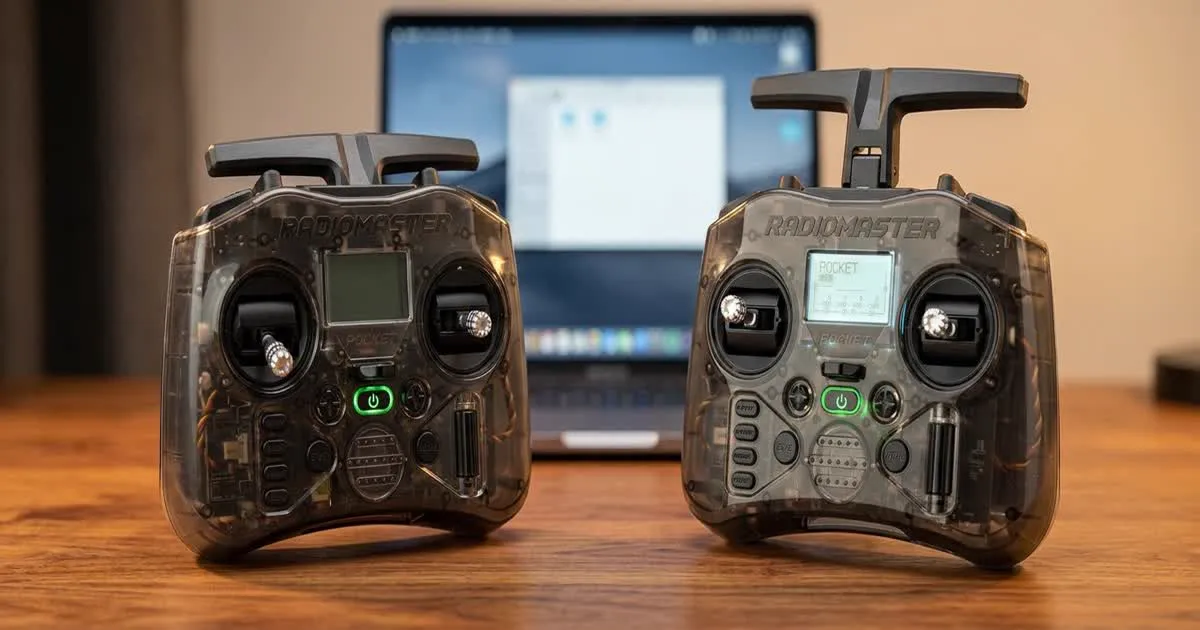
The RadioMaster Pocket is a small, budget-friendly FPV radio with a built-in ELRS module and full EdgeTX software. It suits most beginners well because it is affordable, easy to carry, and covers everything a new pilot needs, though its small size and shorter gimbal sticks may feel cramped to pilots with larger hands.
Size and Ergonomics
The Pocket earns its name. It is noticeably smaller than most full-size FPV radios, closer in size to a game controller than a traditional transmitter. This makes it easy to slip into a small bag or even a large jacket pocket, which is handy if you fly at different spots or travel often.
The smaller body does mean shorter gimbal sticks and less space between your hands. Pilots with larger hands sometimes find the grip a bit tight during long flying sessions. If you have flown a full-size radio before and have big hands, try holding one in person before you decide, since comfort is personal and hard to judge from photos alone.
For most new pilots, especially those coming from a phone or console controller, the compact size feels natural from the first flight.
Gimbals
The Pocket uses hall-effect gimbals, which use magnets and a sensor instead of a physical contact point to read stick position. This design tends to last longer and stay accurate over years of use, compared to older potentiometer-based gimbals that can wear out and get noisy.
The gimbals are shorter in travel than what you find on larger radios, which is the main trade-off of the compact body. Racing pilots who want very fine, precise stick movements over a long throw sometimes prefer a bigger radio for this reason. For freestyle flying and general learning, the shorter throw is not a real problem.
Internal ELRS Module
The Pocket ships with an ELRS module built directly into the radio, so you do not need to buy or install a separate module to get started. This matters because ELRS is the control link most current FPV drones and kits use, as we cover in our guide to what ELRS is and why pilots use it.
Having ELRS built in means less setup work out of the box. You still need to bind the radio to your drone's receiver the first time, but there is no extra module to fit into a bay or wire up separately.
EdgeTX Setup Basics
The Pocket runs EdgeTX, the same free, open-source radio software used across most modern RadioMaster and many other brand radios. If you are new to EdgeTX, expect a small learning curve, since the menu system has many pages covering model setup, mixes, switches, and telemetry.
For a first model setup, you generally need to:
- Create a new model profile for your drone.
- Set the correct channel order to match your receiver, often called AETR1 or similar.
- Bind the radio to your receiver using the ELRS binding phrase.
- Assign flight modes and any auxiliary switches to channels your flight controller expects.
- Set up telemetry so you can see battery voltage and link quality, which our ELRS telemetry setup guide explains in more detail.
None of these steps are difficult on their own, but doing them for the first time takes patience. Following a written checklist, rather than guessing, saves the most time.
Battery Life
The Pocket uses an internal rechargeable battery, charged over USB-C, rather than swappable AA cells some older radios use. In normal use, a full charge lasts through several flying sessions before you need to plug it in again, though exact runtime depends on screen brightness, backlight use, and how often you use built-in features like the simulator connection.
Charging over USB-C is convenient, since you likely already own compatible cables and can top up the radio from a power bank while traveling or between sessions at the field.
Screen and Buttons
The Pocket has a small color screen for navigating menus and checking model settings. It is clear enough for normal use, though the small body means fewer physical buttons than a full-size radio, so some menu navigation takes an extra step or two compared to larger transmitters with more dedicated buttons.
Trainer switches, arming switches, and other auxiliary controls are present but smaller than on bigger radios. This is again the trade-off for the compact size, and most pilots adjust to it quickly.
Strengths and Limits for Beginners
Strengths:
- Low cost compared to most full-size radios with built-in ELRS.
- Small and easy to carry or pack for travel.
- Full EdgeTX support, so you get the same features as more expensive radios.
- Hall-effect gimbals that should hold up well over time.
Limits:
- Shorter gimbal throw may not satisfy pilots wanting very fine control for racing.
- Smaller grip may feel cramped for pilots with large hands.
- Fewer physical buttons than full-size radios, meaning a bit more menu diving.
For a new pilot picking a first FPV radio, these limits rarely outweigh the low price and full feature set. It is a sensible choice if you want to start flying without spending a lot on your first setup, and it pairs naturally with the kind of starter drone covered in our guide on choosing your first FPV kit.